
Latest Version
栋梁 周
Tools
Mac
Free
6443870884
Report a Problem
More About XFindFile Review
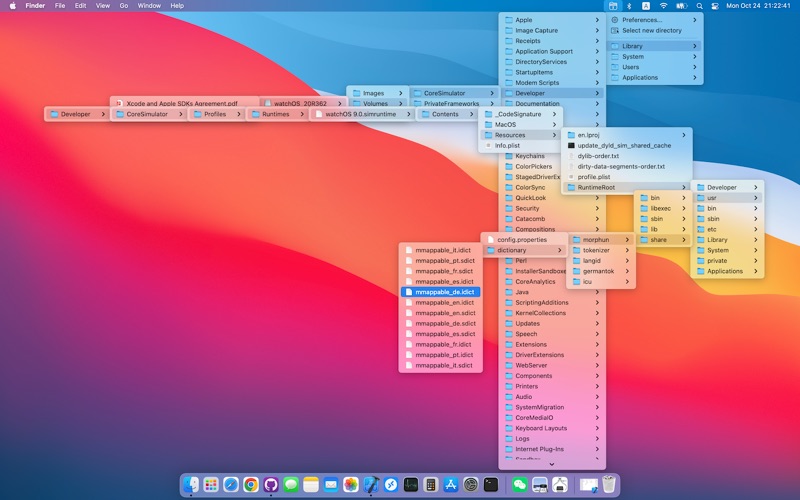
For power users and minimalists alike, keeping a cluttered desktop organized can feel like a losing battle. Enter XFindFile Mac file finder, a lightweight utility designed by developer Zhou Dongliang that aims to simplify how you interact with your local directory structure. Instead of opening multiple Finder windows or relying on heavy search indexing tools, this application integrates directly into your macOS menu bar to put your entire file system just a hover and a click away.
Who Benefits Most from the XFindFile Mac File Finder?
This utility is tailored specifically for professionals, developers, and creative freelancers who work with deep, nested folder structures and need to locate specific assets instantly. If you find yourself constantly navigating deep into project directories or getting bogged down by slow system search tools, the XFindFile Mac file finder provides a refreshing, distraction-free alternative that respects your workspace and system resources.
Key Features and Usability
Despite its incredibly compact footprint, the utility offers a highly practical approach to local file management:
- Menu Bar Integration: The app lives entirely in your Mac's top menu bar, keeping your primary desktop clean and free of unnecessary application windows.
- Hover-to-Locate Navigation: Simply slide your mouse pointer over the menu bar icon to reveal your structured directory tree. Moving your cursor lets you drill down through nested folders effortlessly.
- Instant Execution: Once you locate the target file or directory, a simple click opens it immediately in your default application or Finder.
- Minimal Resource Footprint: Designed as a highly optimized, "very small application," it runs silently in the background without draining system memory or battery life.
An Elegant Alternative to Traditional Search
While macOS Spotlight is excellent for broad system searches, it often returns cluttered results. The XFindFile Mac file finder bypasses search indexing entirely by allowing you to visually map and navigate your actual folder paths. It turns file retrieval into a fluid muscle-memory action rather than a keyboard-heavy typing chore.
Our Editorial Verdict
If you value speed, minimalism, and efficiency on macOS, this utility is a worthy addition to your menu bar. It does one job—helping you locate and launch files instantly—and does it with zero unnecessary bloat. To try this productivity tool for yourself, head over to the official Mac App Store to download it directly to your device.
Rate the App
User Reviews














Popular Apps










Editor's Choice